
Posted by Drafting Equipment Warehouse on Jun 24th 2026
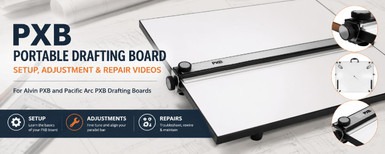
PXB Portable Drafting Board Setup, Adjustment & Repair Videos
The PXB portable drafting board has been one of the most popular drafting boards for students, architects, engineers, and designers for many years. Both Alvin and Pacific Arc offer versions of the PXB board, and while the branding may differ, the boards use the same basic cable-and-pulley parallel bar system.
Like most drafting equipment, a PXB board may need occasional adjustment after shipping or years of use. In most cases, a simple adjustment is all that's needed to get the parallel bar working properly again.
Quick Answer: If your PXB parallel bar is slightly out of alignment, start with the Fine-Tuning Video below. Most adjustment issues can be corrected without rewiring the board.
We have collected videos below to help with setup, operation, adjustment, troubleshooting, and repairs.
Need Help Right Away?
Complete PXB Board Overview (Pacific Arc)
If you're new to the PXB board or are experiencing an issue and aren't sure where to begin, start with the complete overview video below.
This video covers the basic operation of the board, common adjustments, troubleshooting, and general maintenance.
PXB Basics (Alvin Drafting)
This video covers the rear tilt legs and front tractor feet found on PXB drafting boards.
These features help position the board at a comfortable working angle and reduce movement while drafting.
Fine-Tuning the Parallel Bar (Alvin Drafting)
If the parallel bar is only slightly out of alignment, start here.
The adjustment knobs located on the top and side of the board allow you to make small corrections to the parallel bar without making major changes to the cable system.
Common signs that this adjustment may be needed:
- The bar appears slightly out of level
- One side is just a little higher than the other
- Lines are not perfectly parallel across the drawing surface
Many boards can be corrected with this adjustment alone.
Major Parallel Bar Adjustments (Alvin Drafting)
If fine-tuning does not correct the problem, a larger adjustment may be required.
This video explains how to adjust the wire capture system on the back of the board to correct more significant alignment issues.
You may need this adjustment if:
- Fine-tuning has reached its limit
- The bar is noticeably out of alignment
- One side consistently tracks differently than the other
Take your time with this adjustment and make small changes as needed.
PXB Rewiring Guide (Alvin Drafting)
The PXB board uses a cable-and-pulley system to keep the parallel bar synchronized across the drawing surface.
If a cable becomes damaged, disconnected, or needs replacement, this video walks through the rewiring process step by step.
For most users, rewiring is rarely necessary. We recommend trying the adjustment procedures above before moving on to a complete rewire.
Need Replacement Parts for Your PXB Board?
Over time, parts can wear out or just get lost.
We stock replacement parts for many Alvin and Pacific Arc PXB drafting boards, including commonly requested components and hardware.
If you're not sure which part you need, contact us and we'll be happy to help identify the correct replacement.
Ready to Upgrade Your Portable Drafting Board?
The PXB remains one of the best values in portable drafting boards and continues to be a popular choice for students.
We have sold PXB drafting boards for decades and continue to recommend them for students and occasional drafting use. Over time, however, we found that some customers wanted a more professional portable board with a top-mounted parallel bar system and fewer adjustments. That's why we developed our Professional Portable Drafting Boards.
Unlike traditional PXB-style boards, our professional models feature a top-mounted parallel bar system with precision rollers, twin braking controls, and an acrylic inking edge for smooth, accurate operation.
They have become especially popular with architecture students, design professionals, and anyone who spends a significant amount of time drafting by hand.
Professional Portable Drafting Board with Alvin Parallel Bar Professional Portable Board with Pacific Arc Parallel BarFrequently Asked Questions
Why is my PXB parallel bar not level?
Most alignment issues can be corrected using the fine-tuning adjustment procedure. If additional correction is needed, the major parallel bar adjustment video will walk you through the next step.
Does a PXB board need adjustment after shipping?
Occasionally. Drafting boards can experience vibration during transit, and minor adjustments after delivery are not uncommon.
My parallel bar is slightly crooked. Do I need to rewire the board?
Usually not. Start with the fine-tuning procedure first. Most minor alignment issues can be corrected without rewiring.
Are Alvin PXB and Pacific Arc PXB boards the same?
While the branding is different, both boards use the same basic cable-and-pulley parallel bar design and share similar adjustment procedures.
What if the videos don't solve my problem?
Contact us. We've worked with PXB drafting boards for many years and will do our best to help you get your board working properly again.
Need a Portable Drafting Board?
Shop PXB drafting boards, professional portable drafting boards, replacement parts, and other drafting board accessories.
Shop Portable Drafting BoardsVideo Credit: The videos featured on this page were created by Alvin and Pacific Arc and are used here to help our customers set up, adjust, and maintain their PXB portable drafting boards.